Wordle is a toy for generating “word clouds” from text that you provide. If you type a word in more often, it’ll make that particular word larger than the others. You can change your clouds with different fonts, layouts, and colors. You are allowed to print the clouds out or save them to the Wordle gallery to share.
Sunday, January 17, 2010
Kristy: Word Cloud Maker - Wordle.net
http://www.wordle.net/ is another one of my favorite things. This is really fun to let the students use in the classroom. From writing about things you are grateful for around Thanksgiving to using it as a tool to describe yourself, a character in a novel, or almost anything you can think of, the end result is always cool.
Wordle is a toy for generating “word clouds” from text that you provide. If you type a word in more often, it’ll make that particular word larger than the others. You can change your clouds with different fonts, layouts, and colors. You are allowed to print the clouds out or save them to the Wordle gallery to share.
Kris: Alternate Banner
Kristy: Photo Editing without Photoshop
I recently discovered the website http://www.picnik.com/.
I absolutely love this site. You can use many of the features for free, and you can preview the features that only premium members can use. I went ahead and paid the $25 for the year’s membership. It was money well spent.
In addition to simple editing like fixing exposure, cropping, resizing, or removing red eye, Picnik allows users to easily remove blemishes, shine, whiten teeth, add fun text, add frames, or do special effects and collages.
It will allow you to save the edited image to your computer, Facebook, Flickr, MySpace, or other websites. You can even make slideshows.
Listed below are some of my Picniked images.
I used Picnik to airbrush, add highlights, make me thinner, whiten my teeth, change my eye color, and remove shine. Then I used the before and after frame available in the application.
Cool stuff. Of course, I just gave away my secret...
I absolutely love this site. You can use many of the features for free, and you can preview the features that only premium members can use. I went ahead and paid the $25 for the year’s membership. It was money well spent.
In addition to simple editing like fixing exposure, cropping, resizing, or removing red eye, Picnik allows users to easily remove blemishes, shine, whiten teeth, add fun text, add frames, or do special effects and collages.
It will allow you to save the edited image to your computer, Facebook, Flickr, MySpace, or other websites. You can even make slideshows.
Listed below are some of my Picniked images.
This is a photo of my niece, Lilyana:
I did no retouching to the image itself. I just added a frame and text.
This is a photo of me with my nieces Aubree and Kayna:
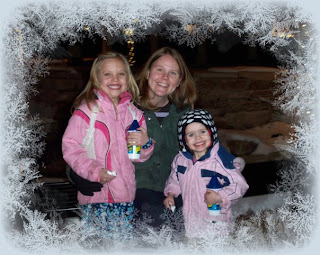
This photo had exposure issues, and we added a frame. It was cold in Colorado.
This is a before and after photo:
I used Picnik to airbrush, add highlights, make me thinner, whiten my teeth, change my eye color, and remove shine. Then I used the before and after frame available in the application.Cool stuff. Of course, I just gave away my secret...
Labels:
Kristy,
photo editing,
photos,
pictures,
website
Saturday, January 16, 2010
Kristy: Fonts, fonts, and more fonts
To those that know me, it’s no secret that I like using alternate fonts to the standards. Due to that, I love the following websites: http://www.dafont.com/ and http://www.kevinandamanda.com/fonts/ which offer a plethora of free fonts for download and no account needed. (There are many free font websites out there. These are just a few of my favorites.)
Thanks to http://www.kevinandamanda.com/whatsnew/tutorials/how-to-use-a-cute-font-for-your-blogger-post-titles.html I was able to use a favorite font of mine as my new Blogger post title font.
For those of you that don’t know offhand how to install a new font, the process is actually pretty easy (but also easy to forget). There are many web resources out there if you search for “How to install a font”, but here is a pretty good tutorial with some screen shots of the process: http://www.kevinandamanda.com/scrapbook/fonts/download-and-install/.
There are also resources out there that allow you to create your own font. I was able to create one for free back in early December, but that company has changed domains and now charges $10 to make your own handwriting font. Even if you pay though, it’s still fun to have your own font. It costs $9 to do it at http://www.fontifier.com/.
There is also http://fontstruct.fontshop.com/. FontStruct lets you quickly and easily create fonts constructed out of geometrical shapes, which are arranged in a grid pattern, like tiles or bricks. Even if you don’t want to make one, you can still download these fonts.
Happy Fonting.
(Yes, I realize that font isn’t intended to be a verb.)
Thanks to http://www.kevinandamanda.com/whatsnew/tutorials/how-to-use-a-cute-font-for-your-blogger-post-titles.html I was able to use a favorite font of mine as my new Blogger post title font.
For those of you that don’t know offhand how to install a new font, the process is actually pretty easy (but also easy to forget). There are many web resources out there if you search for “How to install a font”, but here is a pretty good tutorial with some screen shots of the process: http://www.kevinandamanda.com/scrapbook/fonts/download-and-install/.
There are also resources out there that allow you to create your own font. I was able to create one for free back in early December, but that company has changed domains and now charges $10 to make your own handwriting font. Even if you pay though, it’s still fun to have your own font. It costs $9 to do it at http://www.fontifier.com/.
There is also http://fontstruct.fontshop.com/. FontStruct lets you quickly and easily create fonts constructed out of geometrical shapes, which are arranged in a grid pattern, like tiles or bricks. Even if you don’t want to make one, you can still download these fonts.
Happy Fonting.
(Yes, I realize that font isn’t intended to be a verb.)
Subscribe to:
Posts (Atom)